
Primary references
These sources support the standards and technical explanations in this guide. Color Pick recommendations and product-specific limitations are identified separately in the article.
Upload a palette JSON, CSS variables, Tailwind colors, DTCG tokens, or a Color Pick export and turn the detected colors into a structured design system.
Choose Start a new system, select a local palette or token file, and review the detection summary before importing. The parser supports common palette arrays and objects, Color Pick exports, DTCG and Tokens Studio-style values, Tailwind color objects, CSS variables, and standard CSS color formats. The first detected literal color becomes the canonical brand color; aliases and remaining colors are preserved for review.
The importer recognizes common files instead of requiring one proprietary schema.
Names improve imported token paths and make the next review easier.
{
  "name": "My product palette",
  "colors": [
    { "name": "Primary", "hex": "#2563EB" },
    { "name": "Secondary", "hex": "#7C3AED" },
    { "name": "Success", "hex": "#0F766E" },
    { "name": "Warning", "hex": "#D97706" },
    { "name": "Canvas", "hex": "#F8FAFC" },
    { "name": "Text", "hex": "#0F172A" }
  ]
}The file is loaded first and imported only after you review the detection summary.
Open Design System Doctor and stay on Build & themes.
Select Start a new system for a standalone palette or Merge into current system for deliberate token updates.
Select Choose local file and choose a JSON, tokens, CSS, or TXT file smaller than 1.5 MB.
Review Detected format, Color values, Aliases, Ignored values, and Sample paths.
If the counts look correct, select Import detected colors.
Review the canonical brand color and generated product preview.
Open Architecture Linter to identify raw semantic values, duplicate colors, missing ownership, or layer problems.
Map product roles, run repair evidence, check state coverage, and export a project backup.
A palette supplies colors, but it does not always supply product meaning.
| Source | Imported path | Result |
|---|---|---|
| colors array | primitive.imported.* | Reusable palette colors |
| roles object | semantic.* | Role tokens for review |
| component object | component.* | Component tokens for review |
| Tailwind colors | primitive.imported.* | Scale values |
| DTCG primitive group | primitive.* | Preserved primitive layer |
| DTCG aliases | Resolved alias syntax | Token lineage retained |
| Doctor project backup | Original model | Themes, rules, tokens, and settings restored |
The enhanced importer recognizes several existing Color Pick JSON shapes.
The old message usually meant the JSON was valid but its colors were stored in a shape the parser did not traverse.
The updated importer traverses arrays, nested palette objects, common value fields, Color Pick exports, Tailwind colors, and project token arrays. It also shows a detection summary before import instead of returning only a generic error.
If zero colors are still detected, confirm that actual color values exist as strings or DTCG color objects. Image URLs, palette names, IDs, CMYK-only numeric objects, screenshots, and arbitrary metadata are not automatically converted into web color values.
| Check | Example | Action |
|---|---|---|
| Valid color string | #2563EB or oklch(62% 0.2 255) | Use a supported CSS color |
| Known value field | hex, color, value, $value | Move the color into a recognized field |
| Palette is an array | colors: ["#2563EB"] | Use strings or named objects |
| DTCG type | $type: color | Keep $value with the token |
| File size | Under 1.5 MB | Remove unrelated metadata |
| Full project restore | tokens array with path and value | Use the Doctor project backup unchanged |
The importer reads the selected file in the browser and does not need a token upload endpoint.
Normal site requests such as analytics, consent, advertising, fonts, or page assets are separate from token-file processing. The token importer does not intentionally send the selected filename or token contents to those services.
Imported names and mappings should still be reviewed. A parser can identify color values and aliases, but it cannot know your brand governance, product intent, legal requirements, or every component implementation.
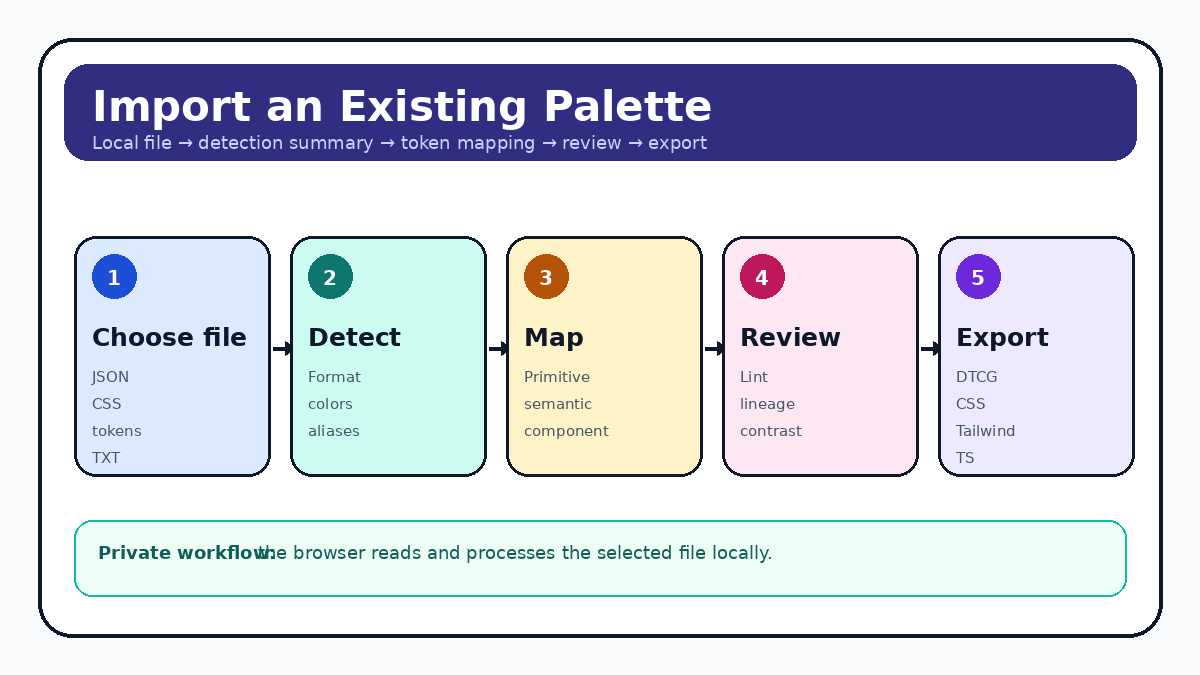
Load the file locally, review the detection summary, choose a safe import behavior, and continue directly into token architecture and accessibility review.
Yes. A raw array or an object with a colors, palette, or swatches array is supported. Named objects create clearer imported token paths than unnamed strings.
Yes. The importer recognizes common Color Pick exports containing palette, colors, tokens, roles, or a Design System Doctor tokens array.
A plain palette provides reusable color values but does not reliably describe product meaning. Primitive import paths preserve the colors without pretending that the importer knows every semantic role.
Not as authoritative web color tokens. Provide a HEX, RGB, HSL, OKLCH, or another supported CSS color representation. CMYK values in Color Pick remain planning approximations unless a real ICC workflow is used.
Review the canonical brand color, inspect token paths, map semantic roles, run the architecture linter, review contrast repair evidence, check component-state coverage, and save a project backup.
These sources support the standards and technical explanations in this guide. Color Pick recommendations and product-specific limitations are identified separately in the article.